What is an animatic?
An animatic is a storyboard cut together with sound. Each storyboard frame is held on screen for as long as its shot will last, over a rough voice track, music and effects, so you can watch the film at its real length before anyone animates or shoots it.
Animation studios, film crews and advertising agencies all use them, and the reason is the same each time: it's much cheaper to fix timing and story problems in a sequence of still pictures than in finished footage.
Updated .
Where an animatic sits in production
In a typical animated film or ad, the work runs in this order:
- Script. What happens and what's said.
- Storyboard. One drawing per shot, showing framing and action.
- Animatic. The storyboard timed to a soundtrack and played as a video.
- Layout and animation. The shots are built and animated, using the animatic as the timing reference.
- Final edit, sound mix and color.
The animatic is usually revised many times. As drawings get replaced with more finished ones, the same edit stays in place, so it gradually turns into the film. Some studios call it a story reel or a Leica reel. In live action, the closest equivalent is previs: rough 3D versions of complex shots, made for the same reason.
Animatic vs storyboard
A storyboard is a set of drawings you read, usually laid out on a page or a wall with notes under each panel. It tells you what each shot looks like.
An animatic is the same drawings played in time. It tells you how long each shot lasts and how the cuts feel against the dialogue and music. A storyboard can't show you that a joke lands a beat too late or that a scene drags. An animatic shows it the first time you watch it.
Animatics can be very simple: one drawing per shot and straight cuts. Many add a little motion, such as a slow push in, a pan across a wide drawing, or a character drawing slid across the frame, to suggest camera moves without animating anything.
Animatic vs animation
Finished animation draws or renders every frame, typically 24 a second in film. An animatic might have one picture for every few seconds. It's a plan for the animation, made quickly and meant to be thrown away or replaced.
| Storyboard | Animatic | Animation | |
|---|---|---|---|
| What it is | Still drawings, one per shot | Those drawings timed to sound | Full motion, frame by frame |
| Sound | Notes under each panel | Scratch voice, temp music, effects | Final recording and mix |
| Answers | What does each shot show? | Does the timing work? | What does the audience see? |
| Time to change | Minutes | Minutes to hours | Days to weeks |
On YouTube you'll also see "animatic" used for a fan genre: storyboard-style drawings cut to a song or a scene from a musical. Those are often finished works in their own right, but they use the same technique.
What animatics are used for
- Timing. Setting how long every shot runs, so the animators know exactly how many frames to make. Animation is too expensive to cut down afterwards the way live action is.
- Story review. Directors and writers watch the animatic to find scenes that drag, confuse or repeat, and rework them while it's still cheap.
- Pitching. A two-minute animatic explains a show, a short film or a game cinematic far better than a script does.
- Testing an ad. Agencies make animatics of TV commercials and show them to test audiences or clients before paying for a shoot.
- Planning narration-led video. Explainers, documentaries and YouTube videos use the same idea: rough pictures over the voiceover to check the pacing before final visuals.
How to make an animatic by hand
Record a scratch track
Read the dialogue or narration into a phone or a cheap microphone. It doesn't need to be good. It needs to be close to the right speed, because the pictures will be timed to it. Add temp music if music drives the piece.
Draw the storyboard panels
One drawing per shot, more for shots with big movement. Rough is fine: stick figures with clear framing beat polished drawings that arrive late. Draw at the shape of the final video, such as 16:9.
Cut the panels to the sound
Import the panels and the audio into an editor and lay each panel on the timeline under the line it belongs to. Stretch or trim panels until the cuts fall where they should.
Add simple moves and effects
Pans, zooms and a few sound effects make it much easier to judge. Stop well short of animating.
Watch it, change it, watch it again
Show it to someone who hasn't read the script. Where they get lost or bored is what to fix.
The usual tools
For drawing, people use whatever they already draw in: Photoshop, Procreate, Clip Studio Paint, Krita, or paper and a scanner. For cutting, any video editor works, including Premiere Pro, DaVinci Resolve, Final Cut Pro and iMovie. Studios often use Toon Boom Storyboard Pro, which does drawing, timing and camera moves in one program and exports the animatic directly.
Making one from a script or voiceover with AI
If you can't draw, or you need to see a long piece quickly, you can generate the pictures instead. Animatic, the product this site is for, takes its name from the technique and works the same way: the voice track comes first, and the pictures are timed to it.
Add the voice track
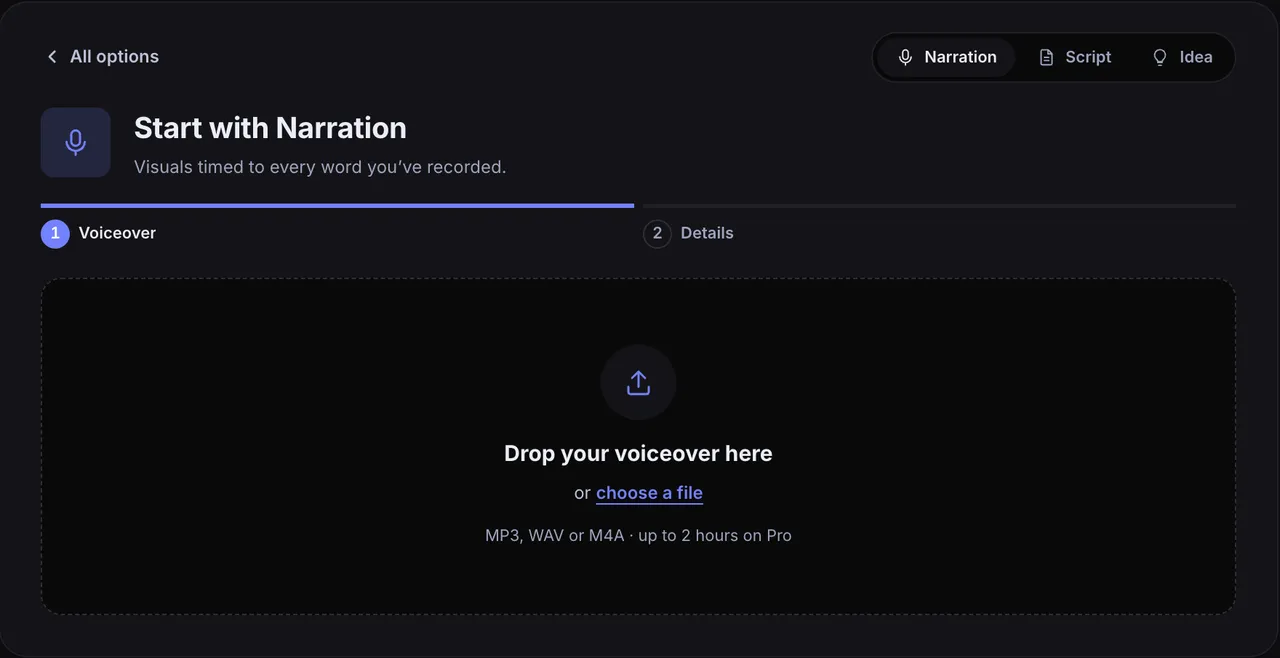
Upload your scratch track (MP3, WAV or M4A) with Start with Narration, or paste a script and pick one of the AI voices.
Start with Narration: drop in the recording and the pictures are timed to it. Check the scene plan
Animatic transcribes the audio and splits it into scenes where the subject changes. Each scene shows its words, its timing and what the picture will show, and you can edit any of them.
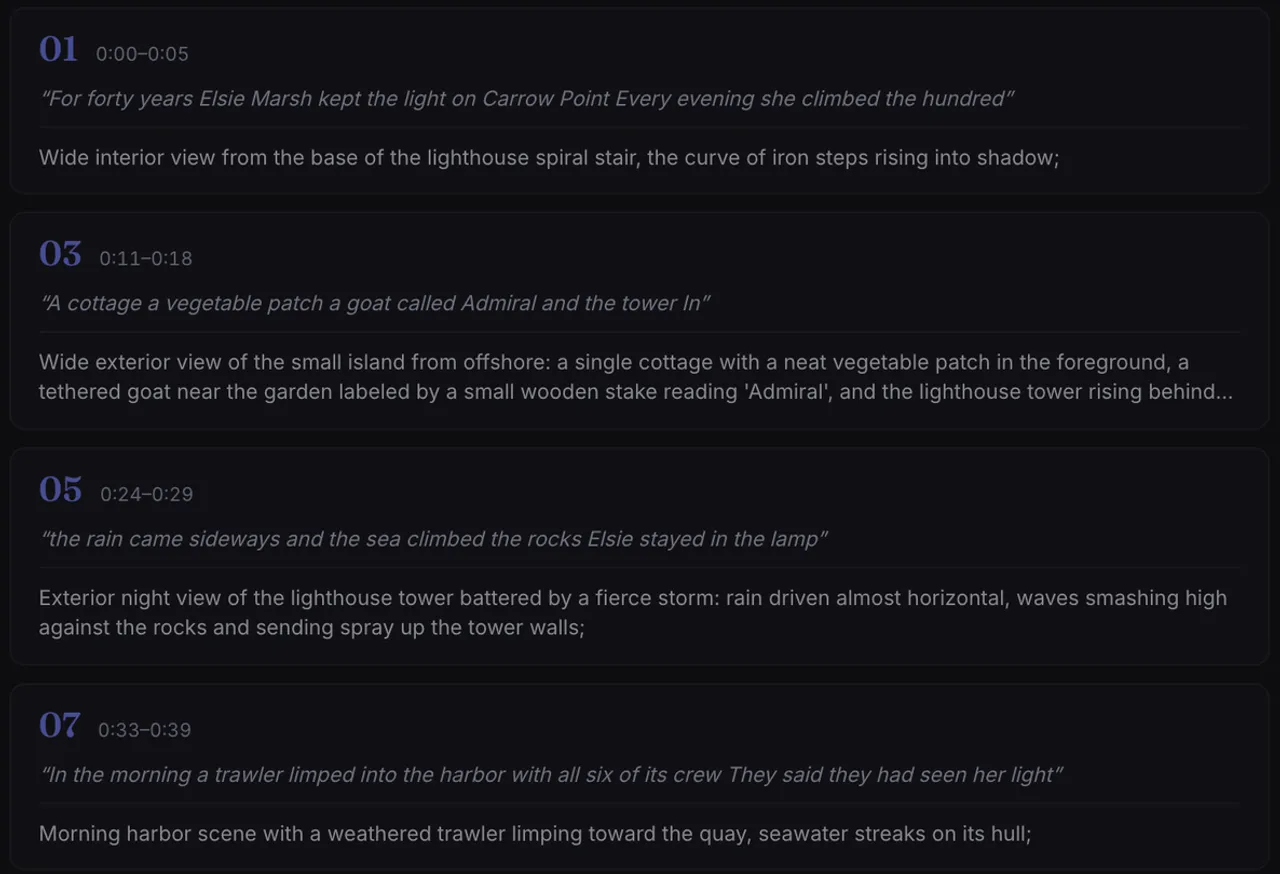
The scene plan works like a written storyboard: one shot per line of narration, with its timing. Generate the pictures
Each scene gets a picture in one Visual Style. There are 20 built in, from concept art and linocut prints to chalkboard drawings and blueprints. Remake any that's wrong.
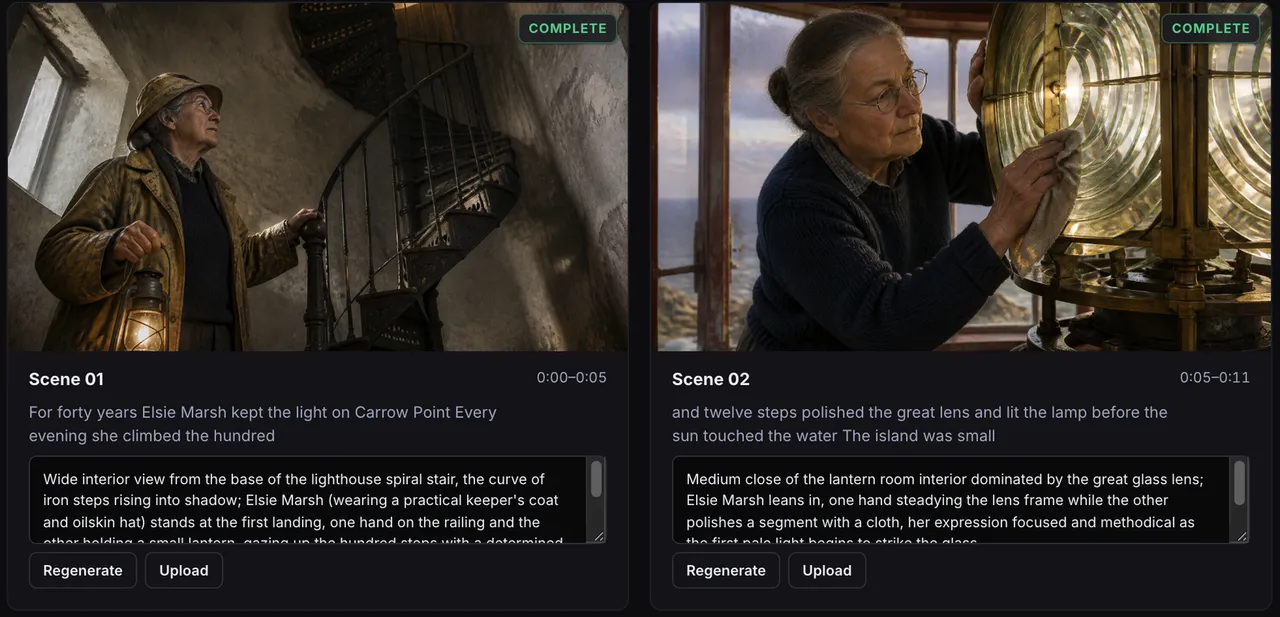
The first two scenes of a lighthouse story, ready to review. Watch it on the timeline
Each picture sits over the words it belongs to, with a camera move and a transition. Play it through, then change any scene's timing, picture or move.
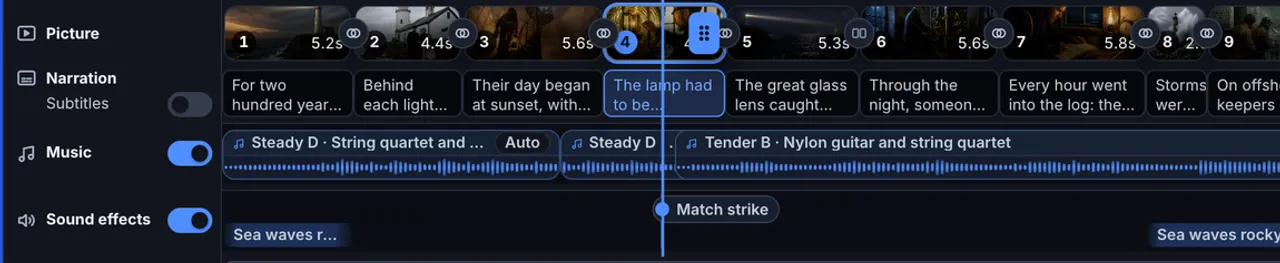
Pictures above the narration they belong to, with music and sound effects underneath. This is an animatic. Export it
Export in 16:9, 9:16 or 1:1 to share or review.
Uploading your own voiceover costs no credits. Each picture costs 3 credits at Standard quality, so a 30-scene animatic is about 90 credits, and Studio shows the cost before anything is made. The free plan gives you 100 credits once, projects up to 10 minutes and 720p exports with a watermark, with no card needed.
For narrated videos where the pictures are the finished visuals, see how to make a long-form AI video.
Questions
How long is an animatic?
As long as the finished film, ad or video. The point is to see the real running time, so every shot is held for as long as it will last on screen.
Does an animatic need sound?
Yes. Timing pictures to sound is what makes it an animatic rather than a storyboard. A rough recording of the dialogue or narration is enough, with temp music and a few effects if they matter to the timing.
Can I make an animatic if I can't draw?
Yes. Stick figures with clear framing work, and so do photos or generated pictures. What matters is that each frame shows the shot and is held for the right length of time.